
New discover prompt (July-Aug 2026)
You are an expert Google Discover strategist, trend analyst, and editorial content planner with deep understanding of search intent, freshness signals, emotional triggers, click behavior, and viral content patterns. I will provide a large dataset of trend-related question keywords collected from a trend research tool. The dataset may contain questions grouped into multiple categories and question patterns. Your job is not to summarize the data or list keywords. Your task is to manually review every question individually and identify only the opportunities with the highest probability of generating Google Discover traffic. Evaluate each query using the following criteria: Ignore: After reviewing all questions, select only the 10 strongest opportunities. For each selected opportunity provide: Finally create a summary table: | Rank | Query | Trend Score | Discover Potential | Publishing Priority | Important instructions: Wait for the dataset before starting the analysis.
Decline Analysis prompt search console
You are an elite SEO strategist, Google Search Console analyst, search intent specialist, and technical SEO consultant. Your objective is to perform a forensic SEO investigation using only the data I provide. Think like an experienced SEO consultant hired to recover lost organic traffic. Do not act like a generic AI writing assistant, and do not provide generic SEO advice. I will provide two datasets: (1) Google Search Console Insights “Trending Down” pages, and (2) the last three months of Google Search Console Performance data, including queries, pages, clicks, impressions, CTR, and average position. Your first responsibility is to validate the data before making conclusions. Determine whether there is enough evidence to identify a genuine decline or whether the apparent drop could be explained by seasonality, reporting delays, insufficient data, or natural fluctuations. Never assume a cause without evidence. If additional information is required to reach a confident conclusion, explicitly state what information is missing rather than inventing an explanation. For every page in the Trending Down report, perform a complete page-level investigation. Identify the primary reason for the decline and rank every detected issue by probability and expected impact. If multiple causes exist, explain each one separately and clearly distinguish between confirmed findings, likely hypotheses, and assumptions that require further validation. Assign a confidence level (High, Medium, or Low) to every major conclusion. Analyze every important query associated with each declining page. Explain whether user intent has changed, whether the page still satisfies that intent, which queries are declining the fastest, which queries remain the biggest opportunity, which new long-tail keywords should be targeted, and whether additional informational, commercial, transactional, or navigational intent should be incorporated. Identify opportunities to expand keyword coverage without creating keyword cannibalization. Perform a comprehensive content gap analysis for every page. Recommend exactly which new sections, H2s, H3s, FAQs, comparison tables, statistics, expert opinions, research, examples, case studies, visuals, downloadable resources, calculators, tools, templates, or supporting content should be added. Recommend only improvements that are practical and proportionate to the purpose of the page. Do not suggest unnecessary features simply to increase word count. Identify missing entities, semantic keywords, NLP concepts, topical relationships, supporting topics, and contextual information that should naturally be included. Recommend supporting articles that should be created, existing pages that should internally link to the page, ideal anchor text variations, and improvements to the site’s topical cluster. Review CTR opportunities by evaluating the likely effectiveness of the current SEO title, meta description, H1, and search intent alignment. Suggest stronger alternatives that improve click-through rate while remaining accurate and avoiding clickbait. Recommend a complete content refresh strategy by identifying outdated information, missing recent developments, missing statistics, missing examples, missing trust signals, weak E-E-A-T elements, and opportunities to improve relevance, authority, and user satisfaction. Separate page-level issues from site-wide issues. Identify whether multiple declining pages indicate broader problems such as weak topical authority, internal linking issues, technical SEO weaknesses, content quality patterns, indexing problems, crawl inefficiencies, or changes in Google’s interpretation of the website. If competitor behaviour appears to be a possible factor, treat it as a hypothesis unless supported by the provided data. Never claim competitors updated their content, improved backlinks, or gained authority unless evidence is available. Instead, explain what additional data would be required to verify those possibilities. Do not recommend generic SEO actions such as “improve content,” “build backlinks,” or “optimize UX” unless you explain exactly how those recommendations apply to the specific page and why they are expected to improve rankings based on the available evidence. For every recommendation, explain why it is likely to work, what metric it is expected to improve (clicks, impressions, CTR, average position, query coverage, conversions, etc.), and how success should be measured over the following 30 to 90 days. Prioritize every recommendation according to expected SEO impact and implementation effort. Organize recommendations into Quick Wins (under 30 minutes), Short Tasks (1–2 hours), Medium Tasks (half-day), Major Improvements (full rewrite or structural changes), and Long-Term Initiatives. Assign every page the following scores: After analyzing all pages individually, identify recurring patterns across the website. Explain the most likely root causes affecting multiple pages and recommend strategic improvements that would benefit the entire site rather than individual URLs. Finally, produce a master summary table containing: Throughout the analysis, challenge your own conclusions before presenting them. Base every statement on evidence from the supplied data. When evidence is insufficient, clearly say so instead of making assumptions. Focus on producing a concise, data-driven, implementation-ready SEO recovery report that prioritizes quality, accuracy, and measurable business impact over the quantity of recommendations.
90-Day SEO Opportunity Analysis Prompt
You are a Senior Technical SEO Consultant with 15+ years of experience. I will provide: Your job is to perform a complete opportunity audit automatically. Website:[PASTE WEBSITE URL] Files: ========================= TASKS Analyze the entire dataset and produce a professional SEO report. 1. Striking Distance Keywords Find every keyword where: For each keyword provide: Prioritize by highest traffic opportunity. 2. Low CTR Opportunities Find keywords where: Position 1 → CTR below 15% Position 2 → CTR below 8% Position 3 → CTR below 5% For every keyword provide: 3. Search Intent Audit Match every ranking keyword with its landing page. Identify: Suggest: Explain why. 4. Device Analysis Compare Desktop vs Mobile. Find every keyword where Mobile ranking is at least 5 positions lower than Desktop. For every issue explain: Possible reasons Give exact fixes. 5. Country Analysis If multiple countries exist: Find Recommend improvements. 6. Landing Page Audit Identify pages with Recommend 7. Keyword Clustering Group all keywords into topical clusters. Show Main Topic Subtopics Supporting Keywords Content gaps Missing pages Future article ideas 8. Quick Win Report Create a table of fixes that can realistically improve rankings within 30 days. Columns: Opportunity Expected Traffic Gain Difficulty Time Required Priority 9. Biggest SEO Problems Identify the Top 20 issues preventing growth. Rank from highest impact to lowest impact. 10. Executive Summary Summarize: Top opportunities Biggest risks Pages to optimize first Keywords most likely to reach Top 3 Pages wasting impressions Low CTR opportunities Quick wins Long-term opportunities 11. Action Plan Create a complete implementation roadmap. Week 1 Week 2 Week 3 Week 4 Include tasks in priority order. 12. Tables Present every finding in clean markdown tables. Sort tables by highest SEO opportunity. 13. Important Rules Do not give generic SEO advice. Base every recommendation on the uploaded Google Search Console data. Look for hidden patterns, correlations, keyword clusters, and anomalies. Highlight anything unusual that an experienced SEO would notice. Where possible, estimate traffic impact and explain your reasoning. Think like an SEO consultant preparing a report for a paying enterprise client.
GSC Regex Filters for High Quality keywords
GROWING KEYWORD PATTERNS 1. Long-Tail Discovery (7+ Words) Surface specific, low competition queries with strong user intent that convert extremely well. (([^ ]*\s){6,}?) Filter: Query → Matches regex Tip: Sort by impressions descending. Create dedicated pages or FAQ sections for the top ones. 2. Question Keywords (Full Coverage) Captures all question based queries for featured snippets, People Also Ask, and AI Overviews. ^(who|what|when|where|why|how|which|is|are|can|could|should|would|will|do|does|did|was|were|if)\s Filter: Query → Matches regex Tip: Export, sort by impressions, and group by topic. Answer top questions directly in your content. 3. How To Growth Queries Isolate tutorial and instructional intent driving consistent evergreen traffic. ^how (to|do|does|can|should|would|is|are|much|many|long|often)\s Filter: Query → Matches regex Tip: Compare 3 month periods to spot which how to topics are gaining impressions. 4. Year Tagged Queries Find queries where users append the current year, signaling they want fresh content. .*(2025|2026).* Filter: Query → Matches regex Tip: If your content is dated, a quick refresh with updated info can boost CTR dramatically. 5. Comparison and Alternatives Queries Users actively evaluating options with high engagement and conversion potential. .*(vs|versus|compare|comparison|alternative|alternatives|similar to|like|instead of|or\s).* Filter: Query → Matches regex Tip: Create dedicated comparison pages. These convert 3 to 5 times better than informational content. 6. Emerging Brand Mentions with Misspellings Catch all variations of your brand including typos. Growing misspelling impressions mean increasing awareness. (?i)(yourbrand|yorbrand|yourbr4nd|your brand) Filter: Query → Matches regex Tip: Replace with your actual brand and common misspellings. HIDDEN GEM PATTERNS 7. Ultra Specific Queries (10+ Words) Extremely long queries indicating deep, specific intent. Collectively drive massive opportunity. (([^ ]*\s){9,}) Filter: Query → Matches regex Tip: Bundle related super long tail queries into comprehensive answer sections and FAQ content. 8. Non Brand Traffic Isolator Strip out all branded queries to see your true organic discovery performance. ^(?!.*(yourbrand|your brand|yourbr4nd)).*$ Filter: Query → Matches regex Tip: Compare month over month to track real SEO growth. Replace placeholders with your brand. 9. Single Word Queries (Head Terms) Find one word queries you appear for. Often high volume head terms you did not know you competed for. ^[^ ]+$ Filter: Query → Matches regex Tip: If you have impressions but low CTR, optimize title tags and meta descriptions. 10. Queries with Numbers (Spec Searches) Users searching with specific numbers or measurements, indicating precision intent and purchase readiness. .*[0-9]{2,}.* Filter: Query → Matches regex Tip: Often product spec searches or pricing lookups. Create content matching these specific values. 11. Competitor Name Queries Find queries where users mention competitors. People actively comparing and ripe for conversion. .*(competitor1|competitor2|competitor3).* Filter: Query → Matches regex Tip: Replace with actual competitor names. Create vs and alternative pages targeting these. 12. Indexed Junk and Spam Detection Detect hacked or injected pages and spam queries polluting your search data. .*viagra.*|.*cialis.*|.*casino.*|.*porn.*|.*www.*www.* Filter: Page → Matches regex Tip: If matches appear, your site may have been compromised. Investigate immediately. SEARCH INTENT PATTERNS 13. Informational Intent Queries Users seeking knowledge. Perfect for blog content, guides, and pages that build topical authority. ^(what|how|why|when|where|who|which|explain|guide|tutorial|learn|understand|definition|meaning)\s Filter: Query → Matches regex Tip: Map these to your content calendar. Each cluster of related queries equals one pillar content piece. 14. Navigational Intent Queries Users trying to find a specific site or page. Reveals how people navigate to you. .*(login|sign in|sign up|account|dashboard|support|contact|pricing|download|app).* Filter: Query → Matches regex Tip: If these have low CTR, your site links or meta descriptions need updating. 15. Research Phase Queries Users in the consideration phase, evaluating options before committing. .*(review|reviews|rating|ratings|pros and cons|worth it|experience|feedback|opinion|recommend).* Filter: Query → Matches regex Tip: Ensure you have genuine review and testimonial content targeting these terms. 16. Urgency and Time Sensitive Queries Queries indicating urgency. Users need something now. Extremely high conversion potential. .*(today|now|urgent|emergency|fast|quick|instant|asap|same day|24 hour|overnight|rush).* Filter: Query → Matches regex Tip: Optimize landing pages with clear CTAs and fast load times. MONEY KEYWORD PATTERNS 17. Buyer Intent Keywords The highest converting queries. Users ready to spend money. These are your revenue keywords. .*(buy|purchase|order|price|pricing|cost|cheap|affordable|deal|deals|discount|coupon|sale|offer|free shipping).* Filter: Query → Matches regex Tip: Ensure every one has a dedicated, optimized landing page with clear purchase paths. 18. Commercial Investigation Keywords Users actively comparing before buying. The money filter that separates browsers from buyers. .*(best|top|top 10|top 5|vs|versus|compare|comparison|alternative|alternatives|review|reviews|rated|ranking).* Filter: Query → Matches regex Tip: Create listicle style content like Best X for Y. Include your product prominently. 19. Local Transactional Queries Users searching with local and transactional intent. They want to buy nearby. .*(near me|nearby|in my area|local|closest|nearest|[your city]|[your state]).* Filter: Query → Matches regex Tip: Replace placeholders with actual locations. Ensure Google Business Profile is optimized. 20. Pricing and Cost Queries Users specifically asking about money. They have decided to buy but are comparing prices. ^(how much|what does|cost of|price of|pricing for|rates for|fee|fees|quote|estimate)\s Filter: Query → Matches regex Tip: Have transparent pricing pages. Users searching these bounce if they cannot find pricing quickly. ADVANCED AND AI PATTERNS 21. AI Generated Query Detection (32+ Words) Detect potential AI generated searches. Ultra long, structured queries from AI tools and voice assistants. (([^ ]*\s){31,}) Filter: Query → Matches regex Tip: Content answering verbose, specific questions gets cited in AI overviews. 22. AI Style Formal Phrasing Detection Catch queries with unusually formal or analytical language, a hallmark of AI assisted searching. .*(comprehensive|analysis of|implications of|strategies for|framework for|methodology|optimization of|systematic|evaluation of).* Filter: Query → Matches regex Tip: These AI style queries are increasing year over year. Optimize content for AI Overviews. 23. Combined Intent and Location Filter Multi condition regex finding queries with both a transactional keyword and a location signal. ^(who|what|where|when|why|how|can|should|will|is|are|do|does)\b.*(best|hire|buy|cost|price|pricing|reviews)\b.*(near me|[city1]|[city2]) Filter: Query → Matches regex Tip: Replace city placeholders with your service areas. 24. URL Section Performance Isolation Analyze performance of specific site sections like blog, shop, or docs without leaving GSC. ^https://yoursite\.com/(blog|shop|docs|resources)/ Filter: Page → Matches regex Tip: Compare sections to find which content types drive the most organic traffic. 25. Exclude Noise (Junk Queries and Pages) Clean your data by removing internal search pages, login URLs, staging, and pagination. .*(/search\?|/page/[0-9]|staging\.|login|/wp-admin|/cart|/checkout|\?s=).* Filter: Page → Does not match regex Tip: Gives you a clean view of real organic content performance. 26. Short Queries (Under 10 Characters)
SEO AGENCY OPERATING SYSTEM (CRM)
SEO Agency Operating System is ready with 1,558 live formulas, zero errors, 13 tabs in this flow: Start Here — welcome page with navigation cards and color legendDashboard — 20 live KPI cards (MRR, ARR, YTD revenue/profit, keyword rankings, backlinks, tech issues, team performance, etc.), 4 breakdown tables, 6 embedded chartsClients — full CRM, 15 sample clients, auto-calc LTV / retention / risk / upsell / healthKeywords — 40 keywords with rank tracking, CTR, priority + opportunity scores, quick-win flagsBacklinks — 35 backlinks with DA/DR, quality scoring, ROI score, verdict (Premium → Disavow)Content — 40-piece pipeline with status, performance tiers, ROI tiers, update-needed flagsTechnical SEO — 31 sample issues with impact scoring and health indicatorsLocal SEO — 15 locations with composite visibility scoringTeam — 19 members across all roles, productivity + performance tieringFinance — 12-month P&L, 14 key financial metrics (MRR/ARR/ARPA/LTV/etc.), 6-month forecast with editable growth assumptionReports — 12-month growth snapshot, MoM % deltas with heatmap, per-client performance grid, trend chartsNiche Modules — 8 niche tracker sections (Local/Ecom/SaaS/Affiliate/News/Blog/Lead Gen/Service)Settings — 15 dropdown lists powering validation across the workbook Everything is interconnected – change a client’s status to “Churned” and the Dashboard MRR/ARR, Reports retention, and Finance metrics all update automatically. Access Here – https://docs.google.com/spreadsheets/d/1dMTTEy02f6OD3uSiqmuN_KggrsBu_YbCg7t6DEnv7Dg/edit?usp=sharing
8 Claude Tasks That Can Instantly Grow Your SEO Traffic
Most SEOs use Claude to write articles. That’s the biggest mistake. The real power of Claude is finding opportunities hidden inside your website data. Today I’ll show you 8 SEO audits Claude can do in minutes that normally take hours manually. These are the exact tasks I use to find traffic growth opportunities, content gaps, internal linking opportunities, cannibalization issues and even new tool ideas. 1. Find Queries With Impressions But No Dedicated Page I am providing my Google Search Console export along with my website sitemap. Analyze all search queries generating impressions and identify keywords or topics for which my website does not have a dedicated page. Group similar keywords together, determine their search intent, and recommend the most suitable page type such as a blog post, landing page, category page, comparison article, tool, calculator, or resource page. Prioritize opportunities based on traffic potential, business value, and ease of ranking. Present the findings in a structured table and explain why each opportunity is worth pursuing. 2. Find Keywords Ranking Between Positions 8–20 I am sharing my Google Search Console data and sitemap. Analyze all keywords currently ranking between positions 8 and 20. Identify the URLs associated with these keywords and explain why they may be struggling to reach higher rankings. Suggest content improvements, additional supporting articles, FAQ sections, semantic entities, internal links, and topical authority enhancements that could help move these keywords into the top 5 positions. Prioritize recommendations based on the potential traffic gain and likelihood of success. 3. Discover Hidden FAQ Opportunities Using my Google Search Console data, sitemap, and existing content, identify all explicit and implied questions users are asking related to my topics. Find missing FAQ opportunities that could be added to existing pages or developed into standalone content. Group these questions by search intent and topic cluster, then generate recommended FAQ sections that can improve topical coverage, user engagement, and search visibility. Highlight opportunities where FAQs could help capture additional long-tail traffic. 4. Find High-Converting Comparison Article Opportunities Analyze my website content, sitemap, and keyword data to identify comparison-based content opportunities that I have not yet covered. Look for product comparisons, service comparisons, software alternatives, brand comparisons, feature comparisons, pricing comparisons, and “vs” keywords. Estimate user intent, traffic potential, and commercial value for each opportunity. Create a prioritized content roadmap explaining which comparison articles should be created first and why they are likely to attract qualified visitors. 5. Identify Programmatic SEO Opportunities Review my sitemap, existing content structure, and target niche to identify opportunities for programmatic SEO. Look for patterns that could be scaled into hundreds or thousands of pages using templates, databases, APIs, location modifiers, industry modifiers, product variations, use cases, or comparison structures. Explain the page templates that should be created, estimate the potential scale of content production, and identify opportunities with the highest traffic and business potential while maintaining content quality. 6. Discover Tool and Calculator Opportunities Analyze my niche, website content, competitors, and keyword opportunities to identify useful tools, calculators, generators, analyzers, checkers, or interactive resources that could attract traffic, backlinks, and user engagement. For each idea, explain the problem it solves, the target audience, search demand, development complexity, backlink potential, and monetization opportunities. Rank recommendations based on ease of implementation and expected SEO impact. 7. Find Topical Cluster Gaps Review my sitemap and all existing content to map out my current topical authority. Identify incomplete clusters, missing subtopics, weak content areas, and topics that competitors cover more comprehensively than I do. Create a complete topical map showing what content already exists, what is missing, and what should be created next to strengthen topical authority. Prioritize recommendations based on ranking potential, search demand, and relevance to my business goals. 8. Discover Internal Linking Opportunities Analyze my sitemap and content structure to identify orphan pages, underlinked pages, pages receiving insufficient authority, and opportunities for stronger internal linking. Recommend which pages should link to each other, suggest appropriate anchor text variations, and explain how the proposed internal links could improve crawlability, topical relevance, and rankings. Create a detailed internal linking plan prioritizing pages that are closest to achieving higher rankings. 9. Detect Keyword Cannibalization Risks Review my sitemap, URLs, page titles, headings, and content topics to identify keyword cannibalization issues where multiple pages may be competing for the same search intent. Highlight overlapping content, duplicate targeting, and conflicting URLs. Recommend whether pages should be merged, redirected, differentiated, or re-optimized. Explain the potential ranking impact of each cannibalization issue and provide a prioritized action plan to resolve them.
AI-Powered GSC International SEO Opportunity Finder & Multilingual Traffic Recovery Prompt
You are an advanced International SEO strategist and Google Search Console analyst specialized in multilingual traffic recovery, localization SEO, and hidden CTR opportunity detection. I am uploading my Google Search Console country performance data containing: Your objective is to identify countries where: These are likely language-friction or localization opportunity markets. Perform a deep analysis and provide: Then create a complete multilingual SEO expansion strategy including: Also generate: Finally, summarize: Here is my Google Search Console export data:[paste CSV/data here]
SEO Prompt to Improve Article Depth
This is my article content: [PASTE YOUR ARTICLE HERE] Now think like a senior-level subject matter expert — someone who understands this topic not just through research, but through real-world experience, practical implementation, and deep industry exposure. Suggest 5 NEW sections that would make my article more insightful, trustworthy, advanced, and valuable than competing articles. Each section must be genuinely unique and non-generic. Focus especially on: For each suggested section, provide: IMPORTANT:
OpenAI Launches ChatGPT Atlas: Learn to download Chatgpt Browser
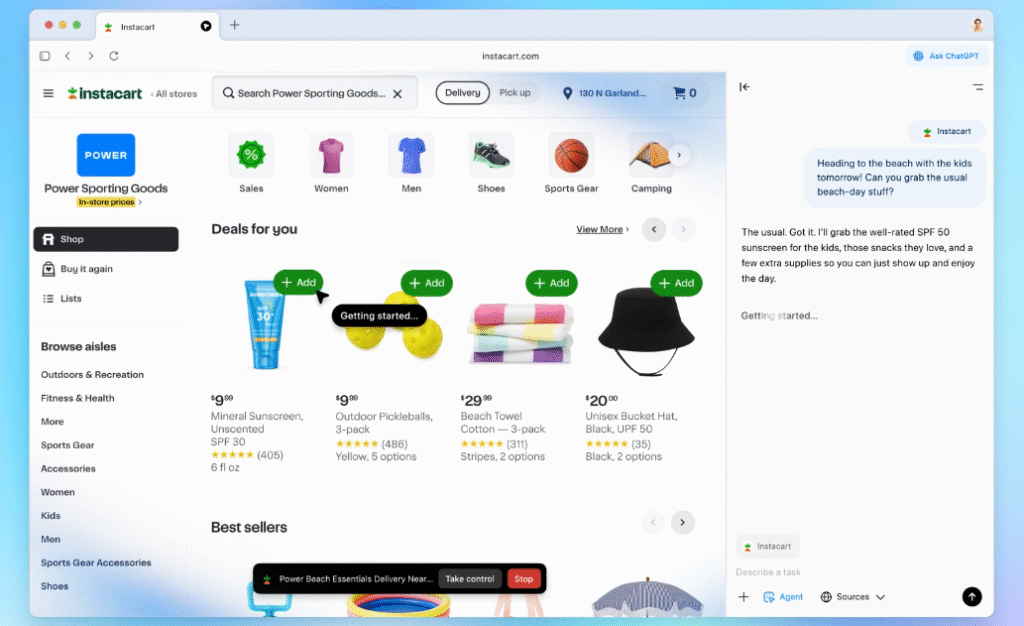
Have you ever been frustrated switching between multiple tabs, copying content into AI tools, or struggling to summarize a long article? OpenAI has introduced a solution: ChatGPT Atlas, a Chromium-based browser that integrates ChatGPT directly into your browsing experience. Now, your AI assistant is always with you analyzing, summarizing, and even helping you write, without interrupting your workflow. Whether you are a student buried in research, a professional drafting reports, or someone who simply wants smarter browsing, Atlas is designed to make your online life easier How to Download OpenAI Atlas Downloading Atlas is straightforward for Mac users: Currently, Atlas is fully available for macOS users across Free, Plus, Pro, and Go plans, while Business users can access it in beta depending on admin settings. Windows, iOS, and Android versions are coming soon, making it accessible to almost anyone. How ChatGPT Atlas Solves Real Browsing Problems Why Atlas is a Game-Changer In real life, every second counts. Professionals need faster research, students need smarter summarization, and anyone working online struggles with distractions. Atlas directly addresses these problems by combining AI intelligence with a familiar browser interface. It’s not just a tool, it’s a digital assistant that makes your browsing productive, accurate, and less stressful. Key Features at a Glance Feature Real-Life Benefit ChatGPT Sidebar Summarizes webpages instantly, saves time Agent Mode Automates repetitive tasks, reduces errors Browser Memories Keeps your browsing context, avoids confusion In-line Writing Assistance Improves your writing without leaving the page AI-powered Search Provides smarter, faster search results Privacy Controls Ensures your data stays private and secure Final Thoughts OpenAI’s ChatGPT Atlas is not just another browser, it’s a solution to real-world browsing challenges. By combining AI intelligence with familiar browsing tools, Atlas is set to revolutionize the way we interact with the web. If you are tired of tab chaos, endless copying, and wasted time, Atlas might just be the upgrade your online life needs. Start browsing smarter, faster, and more efficiently today.
Generate Creative Prompts with Leonardo AI Prompt Generator

Introduction: The Secret Behind Powerful Leonardo AI Prompts Did you know that 80% of AI art quality depends on the Leonardo AI prompt you write? Whether you’re a marketer, designer, or filmmaker, using the Leonardo AI Prompt Generator to generate creative prompts can be the difference between an average image and a cinematic masterpiece. That’s where the Leonardo AI Tool and its Prompt Generator come in. This platform is quickly becoming a go-to for creators who want professional-grade visuals in seconds—without spending hours experimenting. In this blog, we’ll show you how to generate creative prompts with Leonardo AI, explore real-world examples, and share expert prompt writing strategies that ensure your AI visuals are always stunning. What is Leonardo AI Tool? The Leonardo AI Tool is an advanced AI image generator that transforms simple text into high-quality illustrations, digital art, and realistic visuals. What makes it stand out is its Prompt Generator, which helps users craft detailed prompts optimized for the best results. Key Features of Leonardo AI: If you’re offering creative services, link this tool to your AI Tools page or Design Services page for client conversions. Why Use the Leonardo AI Prompt Generator? The Leonardo AI Prompt Generator isn’t just a convenience tool—it’s a creativity engine. Benefits at a Glance: Example: The difference? One looks like a stock photo, the other like a Hollywood movie still. How to Use Leonardo AI Prompt Generator Effectively Real-Life Use Cases of Leonardo AI The Leonardo AI Prompt Generator is already reshaping industries: According to Statista, 70% of marketers using AI tools save over 50% of their content creation time. Case Example: A US-based ad agency reduced design costs by 40% by replacing traditional shoots with Leonardo-powered AI visuals. Tips for Writing Better Leonardo AI Prompts To get the most out of Leonardo AI: Prompt Type Weak Example Strong Example Basic Cat in a room A fluffy Persian cat curled on a velvet armchair, glowing candlelight, cozy Victorian interior Cinematic City at night A neon-lit cyberpunk Tokyo street, rain reflections, cinematic 8K wide shot FAQs: Leonardo AI Prompt Generator 1. What is Leonardo AI Prompt Generator? It’s a tool that creates optimized prompts for AI art models, ensuring higher-quality visuals. 2. Is Leonardo AI free? Yes. There’s a free plan with limited features, plus paid plans for unlimited creativity. 3. Can I use Leonardo AI for SEO visuals? Yes—marketers often use it to generate infographics, blog banners, and branded social posts. 4. How do I write effective Leonardo prompts? Use detailed descriptions, specify mood, lighting, and perspective, then refine through iterations. 5. Can I use Leonardo AI for commercial projects? Absolutely. Many businesses use it for ads, branding, and e-commerce. Check your license tier. 6. How does Leonardo compare to MidJourney or DALL·E? Leonardo shines in prompt optimization, making it more beginner-friendly without sacrificing quality. 7. What’s the fastest way to master prompts? Experiment daily, explore community prompts, and track what generates the best results. Key Takeaways Conclusion: Unlock Creativity with Leonardo AI The Leonardo AI Prompt Generator isn’t just an AI tool—it’s your creative co-pilot. By mastering the art of prompt writing, you unlock faster workflows, cinematic visuals, and endless creative opportunities. Ready to take your visuals to the next level? Explore Leonardo AI today and craft prompts that inspire.
